ROV inspection recording, event tagging and reporting in one workflow. Organise inspections by customer, site and cage, and make footage and reports available to authorised users.
Seekuence Inspection connects ROV video, operator observations and inspection reporting in one structured workflow. Operators can register findings using predefined event tags while the inspection is underway, linking observations to the relevant point in the recording.
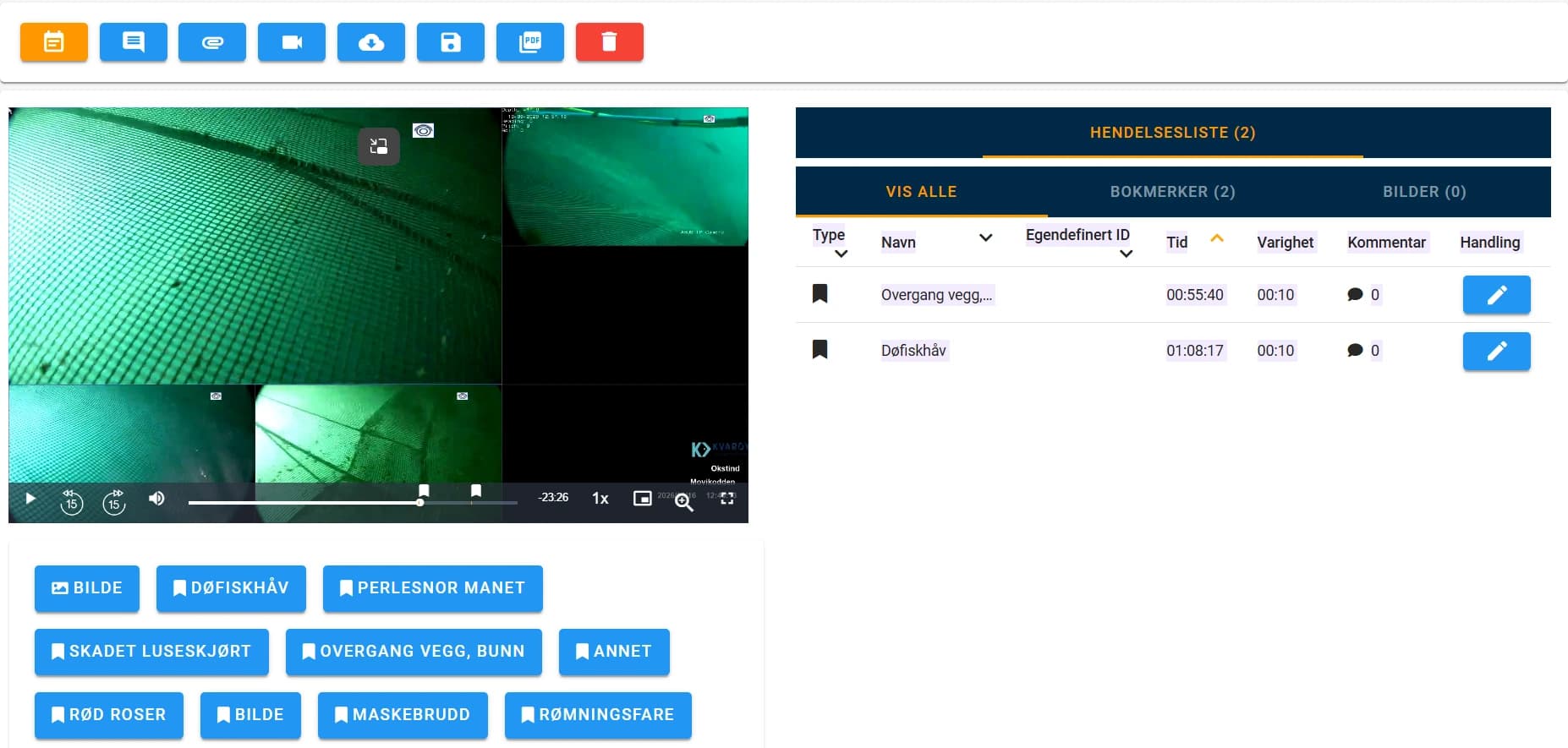
Operational aquaculture inspection setup with timestamped observations and predefined event tags.
System overview
Inspections are organised by customer, site and cage. After the operation, the recording and generated PDF report are available to users with access to the site. Selected video clips can also be prepared and shared for focused review and follow-up.
Benefits
Capture observations during the inspection
Locate findings through timestamped events
Keep records organised by customer, site and cage
Support consistent inspection documentation
Reduce manual reconstruction of findings after the operation
Share focused video clips for follow-up
Keep reports and footage connected
Applications
Maritime surveys and inspections
ROV video inspection
In-water ship surveys
Remote inspection and collaboration
Condition monitoring and maintenance planning
Operator and surveyor training
Technical overview
Posicom documents browser-based viewing, cloud storage capabilities, configurable survey procedures and reports, and comparison of clips and images across inspections. The operational workflow below describes a user-confirmed aquaculture setup. Camera input compatibility and deployment configuration must be checked for the intended equipment; the illustrated video layout does not establish support for separate synchronised camera inputs.
Technical details
+From ROV operation to documented findings
1. Select the inspection
Choose the customer, site and cage, and set up the inspection task.
2. Start recording
Start the recording as the ROV operation begins. The inspection interface can be used on a separate screen alongside the ROV pilot’s display.
3. Tag observations
Use predefined event buttons to record observations during the inspection. Each event is linked to a timestamp in the recording.
4. Review the findings
Use the event list and recorded footage to review observations in context.
5. Generate the report
Generate a PDF report after the inspection and retain it alongside the recording.
6. Share and follow up
Make the inspection available to authorised site users and prepare selected video clips for the people responsible for follow-up.
+Record observations as they happen
Tagging and retrieval
Predefined tags help operators register observations consistently while the ROV inspection is in progress. Timestamped events connect the observation to the recorded footage, making relevant sections easier to locate during review.
Aquaculture setup examples
Net damage; Damaged lice skirt; Wall-to-bottom transition; Escape risk; Other observations. These are examples from an aquaculture setup, not a mandatory or exhaustive standard list.
+Keep inspections organised
Customers, sites and cages
Manage inspections across multiple customers and sites, with recordings associated with the relevant cage and task. This structure helps teams locate the right inspection and maintain an organised record of completed work.
+Make findings easier to follow up
Reports and clips
A PDF report provides a structured summary, while the recording preserves the visual context. Selected clips can be shared for focused review, helping the recipient understand the observation without working through the entire recording.
+Give the right people access
Site access
Users with access to the relevant site can retrieve the inspection footage and reports. This gives operational teams and customers a shared basis for reviewing findings and planning follow-up.
Product advice
Let’s discuss your requirements
Tell us about your application, operating conditions and preferred configuration.